Manufacturing company can notify employees in second with Everbridge

A manufacturing company based in the American mid- Atlantic relies on Everbridge to keep their employee-base of over 17,000 safe during emergencies. With Everbridge, they have the tools they need to communicate with staff whether there’s a critical weather event, ongoing health crisis, or security threat that puts their stakeholders at risk.
Highlights
Everbridge customer since 2017.
With Everbridge, notifications are quickly sent to all impacted users simultaneously.
Responses from impacted employees are received within seconds.

Customer spotlight
A conversation with Senior Director, Operational Risk & Strategy
What is your primary use case?
I’m a manufacturing and distribution company’s Senior Director of Operational Risk and Strategy. Anything related to technological or safety risks runs through my team.
We use Everbridge to provide alerts about extreme weather events. We’re located in the mid-Atlantic region, so hurricanes are common, but we also use it for ice storms, snow, tornadoes, etc. We use Everbridge to send notifications to our teammates and ask them about their status. For example, we send follow-up questions to impacted teammates, asking them, “Do you need anything? Do you need help? Can we reach out to you?” Everbridge enables two-way communication.
Weʼve also used Everbridge to complete daily health check-ins. Some of our facilities are high-density, so we wanted to make sure that we ask questions about symptoms before our employees come to work.
The third use case would be any other type of emergency, such as a security threat. We can use Everbridge to inform employees of an event that may impact them, such as a protest or a shooting. We could send out a message telling them to avoid
the area.

“Everbridge allows us to protect our most important asset: our employees. Without a tool like Everbridge, we have no way to communicate with a large number of people in seconds.ˮ
-Sr. Director, Operational Risk & Strategy, Manufacturing Company
How has Everbridge helped your organization?
Everbridge allows us to protect our most important asset: our employees. We must protect the people
who make deliveries for us, sell our products, work in our facilities, or come to an office. Without a tool like Everbridge, we have no way to communicate with a large number of people in seconds.
Some employees donʼt have direct access to company-based email, but they usually have personal devices. Some employees have company devices, but many do not, so we use Everbridge to communicate with them directly.
My teamʼs mission is to minimize risks to our facilities and people. We protect our people, care for them, and check on them to ensure theyʼre okay during a crisis. In general, employee safety creates massive value for our organization. If we prioritize employee safety from top to bottom, it affects productivity, morale, and turnover. Weʼre retaining employees because people want to work for an organization that cares about them.
It sends a message to a frontline teammate that the company cares enough to communicate with them. Weʼre asking about their well-being and their families during an emergency. Everbridge allows us to fulfill that vision through a simple communication tool. It enables us to build a safety culture throughout our organization.
Everbridge helps us save time when we send out communications. Before we had Everbridge, we had to use call trees and spreadsheets to contact each employee one by one to check on them. When a storm came through, we had supervisors pull up the spreadsheet and call. Using Everbridge, we can quickly send a notification, and everybody gets it simultaneously. Everybody can respond or acknowledge that they received it within a couple of seconds.
What is most valuable?
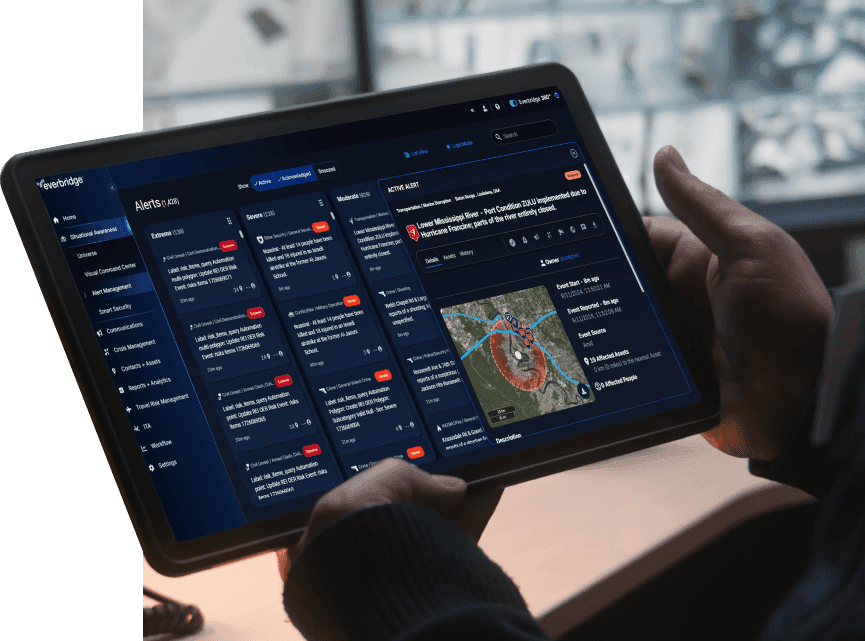
We like the ability to integrate geolocation data from our HR system that tells us where teammates work or live. That information helps us calibrate the notification. If we know a storm or a tornado will hit a specific area, we can look at the map view within Everbridge.
If you have a hurricane on the coast, you can chart its path on the map using the weather overlay tool. Then, you can select the impacted teammates on the screen. From there, you can create a notification that targets those specific teammates. Itʼs critical to ensure your notifications are tailored to those affected by a particular event. You donʼt want to send it to everybody in the state or at one location. The notifications should be restricted to those who are impacted.
The templates are also helpful. If youʼve got a scenario where you need to communicate quickly, you can create a new notification and type what you want to send out to the impacted individuals. Itʼs better to think about that before an event takes place. Thatʼs where templates come in. You can save templates in a list and customize those as needed.
There are always variables. Some variables change in every situation. The tool asks a few quick questions, and you can quickly draft a notification based on whatʼs already pre-built within the product. You donʼt need to scramble to type out a lengthy message and accidentally write something that might expose you to legal liability. We want to ensure each message has been thought out and approved by management instead of doing it in the heat of the moment.
We can ingest data from our HR system into Everbridge, like employeesʼ names, departments, and contact information. For example, we can send notifications based on job titles and pay statuses. We might need to send messages to all non-salaried positions, supervisors, etc. If we collect that data on our side, we can send it to Everbridge, allowing us to tailor the notification based on essential demographic information or additional values in those data fields. For instance, I can send a message targeted to everyone in Nashville who is a manager and has a specific job title.
How long have you used Everbridge?
We have used Everbridge since 2017.
What do you think about the stability of the solution?
We havenʼt had problems with stability. Everbridge has been extremely reliable for us. We havenʼt had any downtime.
What do you think about the scalability of Everbridge?
Some companies using this tool have more than 100,000 employees, but weʼre smaller. We have 17,000 employees who could receive notifications and havenʼt run into any scalability issues with the software.
How would you rate customer service and support?
Good. They have a 1-800 number we can call, and we have a client account manager. They also have online support and something called Everbridge University, their complete learning solution for the tool. When I need to train new people on how to use the tool, I send them to Everbridge University. There are a lot of courses covering everything from sending notifications to creating messages. Their training offerings are pretty robust.
During implementation, they sent someone to our location for a few days to work with our team and ensure we were properly trained. They helped us implement the solution and get some templates going.
How was the initial setup?
Deploying Everbridge was very manageable and went smoothly. As with any implementation of this kind, one of the most involved parts is getting employee data connected and making sure everything is aligned from a contract standpoint, but the Everbridge team helped with both of these.
From a cyber-liability standpoint, we took a thorough, security-first approach to ensure everything was locked down and fully compliant with our internal measures. Because we were working with personal data, we made sure the right safeguards, security and controls were in place. Once that was done though, the platform was very easy to use, and the overall experience felt streamlined and straightforward.
What was your ROI?
Itʼs hard to calculate the return on investment because we canʼt put a dollar amount on employee safety. However, the ability to communicate quickly and save lives could potentially help us avoid claims that cost millions of dollars. We can definitely get ahead of that by sending notifications and checking on our employees.
Thatʼs where the ROI comes in. Previously, we were solely reliant on supervisors at a location to manage a crisis, communicate with their teams, etc. This allows us to send alerts down, and we know they will be delivered.
What other advice do you have?
There are a few mass notification players out there, so you should find a tool that fits your culture, is easy to use, and makes sense for your organization. They may have similar functionalities, but some are better than others. Ease of use is where you will get the most value, but security is also crucial. You need a secure company that will protect your data. Check the terms of use and provisions on data privacy. Do your homework on each one.
Related resources

Practical AI for operational resilience
Autonomous when you want it, human-guided when you need it AI has quickly become one of the most discussed technologies…

Wildfire smoke creates health and operational risks in the Northeast
Wildfire smoke is reducing air quality across the Northeast and Mid-Atlantic, creating health risks and operational challenges for businesses and communities.

How Burns & McDonnell protects travelers during global crises
Discover how Burns & McDonnell uses Everbridge Travel Risk Management to protect employees during global travel. Learn how real-time threat intelligence, location awareness, and emergency communications strengthen duty of care and help keep traveling employees safe during critical events.