How quickly would you be able to notify your employees should they be at risk? Imagine being able to inform and connect your entire team during an emergency – within seconds, no matter where they are located. In today’s fast-paced and interconnected world, ensuring effective communication during critical events is paramount to keeping people safe and informed. Traditional emergency notification methods like sirens and radio broadcasts are no longer sufficient, especially with the rise of mobile and remote workforces.
An emergency mass notification system (EMNS), or mass notification system (MNS), is a crucial solution for sending timely and accurate notifications to individuals or groups, regardless of their location. Most importantly, emergency mass notification systems help leaders ensure their people are safe, and operations, supply chains, and brand reputation are protected.
In this blog, we will identify the fundamentals of emergency mass notification systems, their importance, and the key features to consider when selecting a system, along with real-life case studies highlighting the impact of efficient emergency communication. If you are ready to start researching, we’ve compiled a list of the 15 most critical questions to ask mass notification vendors during your selection process in our “Mass Notification Buyer’s Guide”.
What is an emergency mass notification system?
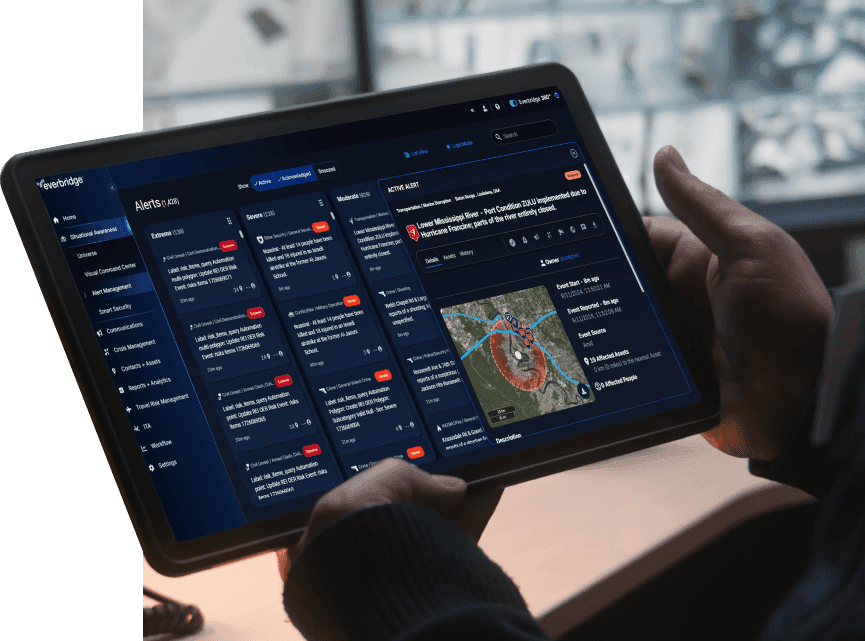
An emergency mass notification system is a comprehensive platform that facilitates the rapid dissemination of emergency messages to targeted recipients through multiple communication channels. These channels may include voice calls, SMS, push notifications, desktop alerts, digital signage, and even social media. By leveraging visual intelligence and user-friendly interfaces, an EMNS ensures that the right message reaches the right people during critical events, regardless of the communication device they use or their physical location.
These systems can also be referred to as just mass notification systems. This is because organizations have found that an EMNS can provide value outside of emergency situations. Within one system, organizations can streamline their everyday communications and proactively manage a critical event should it occur.
An EMNS operates through a user-friendly interface that allows users of all levels to quickly send emergency communications. During a critical event, the system targets individuals rather than devices, escalating notifications to subsequent recipients if required, and broadcasting messages across various communication devices. The ability to set up templates with predetermined contacts and messages streamlines the process, while call-throttling protects infrastructure capacity, preventing network overload during mass notifications. Additionally, an EMNS can offer two-way communication, enabling recipients to confirm receipt of the message or alert, request more information, or provide crucial updates, fostering a seamless flow of information during emergency situations.
What are the benefits of using an EMNS?
The importance of an EMNS lies in its ability to mitigate the impact of critical events on productivity, revenue, and safety. By promptly delivering messages to recipients, organizations can avoid production slowdowns, delayed responses to time-sensitive issues, and hindered team callouts, thereby safeguarding business continuity. The benefits of an EMNS extend to all industries, including educational institutions, government agencies, corporations, and communities. For example, schools can quickly notify students and staff of campus emergencies, while businesses can mobilize their workforce in response to safety threats or operational disruptions.
In addition to improving emergency response and crisis management, an EMNS can also enhance overall preparedness by promoting proactive communication during non-emergency situations. Organizations can use the system to optimize routine notifications, such as reminders, policy updates, and event announcements, fostering a culture of consistent and reliable communication.
How to select an emergency mass notification system?
When choosing a mass notification system, several factors demand consideration to ensure the system aligns with the organization’s specific needs and effectively addresses potential challenges. Scalability is crucial to accommodate organizational growth, especially for expanding businesses and educational institutions. Integration capabilities are essential to ensure seamless connectivity with existing systems, such as human resource databases and intelligence feeds, to streamline information exchange.
Ease of use is paramount, especially during high-stress situations. The system should be accessible to all users, regardless of their technical expertise. A user-friendly interface and intuitive navigation enhance the system’s usability and enable quick actions during emergencies. Furthermore, an easy-to-use system reduces human error during critical events, leading to more rapid resolution times.
Of course, finding the right questions to even ask vendors can be difficult. If you need help, we’ve put together a comprehensive guide of the 15 most important questions to ask vendors when looking for a mass notification system.
How do agencies send an emergency alert step by step?
When a critical event occurs, agencies and organizations follow a consistent notification sequence to reach the public or their workforce quickly and accurately:
- Detect and verify the threat. Confirm the event using sensor data, weather feeds, law enforcement reports, or employee-reported incidents before issuing an alert.
- Select the affected population. Use geo-targeting or pre-built contact groups (by location, building, department, or role) to identify exactly who needs to be notified — avoiding unnecessary alerts to unaffected people.
- Choose the message template. Pull from pre-approved message templates for common scenarios (severe weather, active threat, facility closure) to reduce drafting time during high-stress moments.
- Send across multiple channels simultaneously. Push the alert via SMS, voice call, email, mobile app push notification, desktop alert, digital signage, and social media at the same time to maximize the chance of delivery.
- Monitor delivery and responses in real time. Track who has received, opened, and acknowledged the message using built-in reporting dashboards.
- Escalate to unresponsive recipients. Automatically re-route the alert to backup contacts or supervisors if a recipient does not confirm receipt within a set time window.
- Collect two-way responses. Allow recipients to reply with status updates (“I’m safe,” “I need help”) or request additional information, feeding data back to incident commanders.
- Document the incident for after-action review. Export delivery logs and response times to support compliance reporting and post-incident debriefs.
This sequence applies whether the notifying party is a police department alerting residents, a school alerting parents, or a corporation alerting employees during severe weather.
What are the key features of an EMNS?
An effective mass notification system incorporates essential features to enhance emergency communication and maximize its impact. Geo-targeting capabilities allow organizations to deliver messages precisely to affected areas, avoiding unnecessary alerts to unaffected regions. Multi-channel support ensures redundant communication paths, improving the chances of successful message delivery. A well-rounded mass notification system can reach individuals through their preferred language and various means, including voice calls, SMS, push notifications, desktop alerts, and emails, catering to diverse communication preferences.
Detailed reporting and analytics features enable organizations to evaluate the performance of the system, analyzing metrics like message delivery rates, response times, and recipient feedback. This data-driven approach helps fine-tune communication strategies, identify areas for improvement, and enhance the overall effectiveness of the system.
Another vital feature of an effective mass notification system is automated publishing to websites, social media, and internal systems. This capability extends the reach of emergency messages beyond direct notifications, allowing the broader community to stay informed about critical events. By disseminating information through multiple channels simultaneously, organizations can create a unified and consistent message, minimizing confusion and misinformation.
How do organizations track employee safety during a natural disaster?
Beyond sending alerts, agencies and safety teams need to confirm that every person is accounted for during and after a disaster. A mass notification system supports this through:
- Automated safety check-ins. The system sends a follow-up message asking recipients to confirm their status (“safe,” “need assistance,” “unable to respond”) and logs each reply automatically.
- Real-time status dashboards. Safety teams see a live map or list showing who has responded, who is unaccounted for, and who has flagged that they need help — without manually calling each person.
- Location-based accountability. For organizations with travel or field personnel, the system cross-references last-known location data against the affected geographic zone to prioritize outreach to people in harm’s way.
- Automatic re-notification. Anyone who hasn’t responded within a defined time window is automatically re-contacted through a secondary channel (e.g., voice call if SMS goes unanswered).
- Post-event reporting. Once the event concludes, teams can export a full accountability report showing response times and outstanding check-ins, which supports duty-of-care documentation and after-action reviews.
This check-in and accountability workflow is what separates a basic alerting tool from a full emergency mass notification system — it closes the loop between “message sent” and “person confirmed safe.”
Prioritize testing and training
Regular testing and training are essential to maintain the reliability and efficiency of the EMNS. Conducting drills and simulations enables organizations to identify potential issues and refine response procedures, ensuring seamless execution during real emergencies. Adequate training for personnel is crucial to ensure that they can proficiently operate the system under high-stress situations, reducing the risk of errors and enhancing overall preparedness. When looking for a vendor, it is important to ask whether they have resources to help your organization get up to speed when it comes to using their solution.
Organizations should establish a testing schedule, including both routine tests and surprise drills, to assess the system’s functionality and identify any areas of improvement. These tests should involve all relevant stakeholders, from administrators to end-users, to ensure comprehensive training and readiness.
Best practices for implementation
Successful implementation of an EMNS involves several best practices that organizations should follow to maximize the system’s potential. Firstly, organizations should establish clear communication protocols and guidelines for using the system. This includes defining roles and responsibilities during emergencies, and ensuring that key personnel have the necessary permissions and access to operate the system effectively.
Developing a comprehensive contact database is essential to ensure that all individuals who need to receive emergency notifications are included in the system. Organizing contacts based on location, department, or facility helps target messages precisely, avoiding unnecessary notifications to unrelated recipients.
Moreover, designing escalation procedures ensures that critical information reaches the right individuals and groups promptly. Establishing a clear hierarchy for notification escalation minimizes delays and ensures timely communication during escalating events.
Where does mass notification fit in an overall disaster management strategy?
Mass notification is one component of a broader disaster management strategy, not a standalone fix. Agencies and organizations typically combine it with:
- Emergency operations planning. Written plans that define roles, decision-makers, and communication triggers before an event occurs — the notification system executes these plans once a trigger is met.
- Interoperability with public warning systems. Many organizations integrate their notification platform with public alerting infrastructure (such as Integrated Public Alert & Warning System-compatible feeds) so private alerts stay consistent with official government warnings.
- Risk intelligence monitoring. Continuous monitoring of weather services, seismic data, and public safety feeds to trigger alerts automatically rather than waiting for manual reporting.
- Regular drills and tabletop exercises. Scheduled simulations that test whether the right people receive alerts, respond, and escalate correctly — not just whether the software technically works.
- After-action review and continuous improvement. Reviewing delivery times, response rates, and gaps after every real event or drill to refine contact lists, templates, and escalation rules.
Organizations that treat mass notification as one piece of this larger cycle — plan, alert, respond, review — see faster resolution times and fewer communication failures than those relying on the software alone.
What is an example of a successful case study?
A common challenge many organizations face today is outgrowing their established, manual processes. To keep up with an increasing number of risk events in addition to growing communities or employee bases, manual processes are quickly becoming no longer sufficient. More and more, organizations are turning to technology and automation to ensure they can successfully reach all their people and protect their assets before, during, and after critical events.
The Chief of Police at West Milton Police Division stated, “We used to use billboards. We used to do news flyers years ago. Those days have gone. Public officials need something in place to communicate with the residents in their community—for all events, not just emergencies. That’s why we moved to Everbridge.” If you’d like to learn more, read the rest of the case study here.
Build resilience to keep your people safe and your organization running
At the end of the day, you want a mass notification system that can grow with you into the future and strengthen your overall resilience against critical events. You can’t go wrong by working with a leading industry thought leader who has the receipts to back up their critical event management experience. A reputable vendor doesn’t just react to industry advances, but molds and shapes the industry with progressive thinking, innovative solutions, and participation in interactive community events and forums.
If you want the option to build on your mass notification capabilities in the future, then you will need a vendor who offers more than just a single product with no additional ways to expand functionality. This way, you only have to access one application, without the additional costs and headaches of integrating multiple solutions. Even if a mass notification system meets your needs now, it’s good to have options if your needs expand over time.
It can be challenging to figure out what’s important when searching for a mass notification system that will work for your environment. To learn more, be sure to view the Mass Notification Buyer’s Guide for all the insight and information you need to make the right choice.
Frequently asked questions
A lone worker app is software designed to protect employees who work without direct in-person supervision, including field technicians, home healthcare workers, retail staff, and remote employees. Core functionality typically includes real-time GPS location tracking, panic/duress alarms, automated check-in timers, and escalation to a monitoring center or internal security team when a worker doesn’t check in or triggers an alert. More advanced platforms extend this into broader critical event management, connecting individual worker safety events to organization-wide emergency communication and response.
Start by mapping your organization’s actual risk profile. How many employees work alone or remotely? Do they operate in low-connectivity environments requiring satellite support? Do you need a 24/7 monitoring center, or does your organization have an internal security team capable of responding to alerts directly? Beyond core lone worker features, evaluate: Scalability — can the platform grow from a pilot group to your full distributed workforce? Integration — does it connect to your existing mass notification, HR, travel management, or security operations systems, or does it operate as an isolated app? Compliance and audit reporting — can you produce documentation demonstrating duty-of-care compliance? Escalation flexibility — can alert routing be customized to your organization’s incident response protocols rather than a fixed vendor workflow? Organizations with a single small team may be well served by a standalone check-in app. Organizations with multiple locations, a security operations function, or regulatory duty-of-care exposure typically outgrow point solutions and need a platform built for connected, high-velocity critical event management.
OSHA does not maintain a single standalone “lone worker” standard, but the General Duty Clause (Section 5(a)(1)) of the OSH Act requires employers to provide a workplace free from recognized hazards likely to cause death or serious harm — an obligation that extends to employees working alone or in isolation. Certain OSHA standards address lone working conditions directly in specific industries, such as confined space entry rules and permit-required confined space monitoring. Employers are generally expected to conduct a risk assessment for solo or remote work, establish a means of checking on worker status, and maintain a documented emergency response plan capable of locating and assisting an employee in distress.
ISO 45001 is the international standard for occupational health and safety management systems. It does not prescribe specific lone worker technology, but it does require organizations to identify hazards, including those associated with solitary or remote work, assess risk, and implement controls proportionate to that risk, with documented processes for monitoring, incident response, and continual improvement. Many organizations use ISO 45001 certification as the framework for justifying investment in lone worker and employee safety software, since the standard expects demonstrable, auditable evidence of hazard controls rather than informal safety practices. Duty-of-care obligations — a legal and ethical requirement to protect employee wellbeing — reinforce this: organizations that fail to implement reasonable monitoring and emergency response capabilities for at-risk employees can face liability exposure regardless of formal certification status.